

XGO-Duck Biped Robot Electronics Kit (Arduino UNO Q Board NOT Included)


XGO-Duck Biped Robot Electronics Kit (Arduino UNO Q Board NOT Included)
Please note: The Arduino UNO Q board is not included. You will need to provide your own board.
New Product Launch Offer — Enjoy 12% off!
Now in Pre-sale — Ships within 14 Days.
Due to the complexities of international shipping, returns are not accepted once your order has shipped. If you experience a product quality issue, we will arrange a replacement shipment or an exchange.
Build your own expressive biped robot with XGO-Duck. Powered by Arduino UNO Q and 15 serial servos, this DIY electronics kit lets you explore robot motion with browser-based control, calibration, and configuration.
3D-printed structural parts are not included. Printing, assembly, and software setup are required.
01 / CURIOUS BY DESIGN
Small robot.
Real robotics.
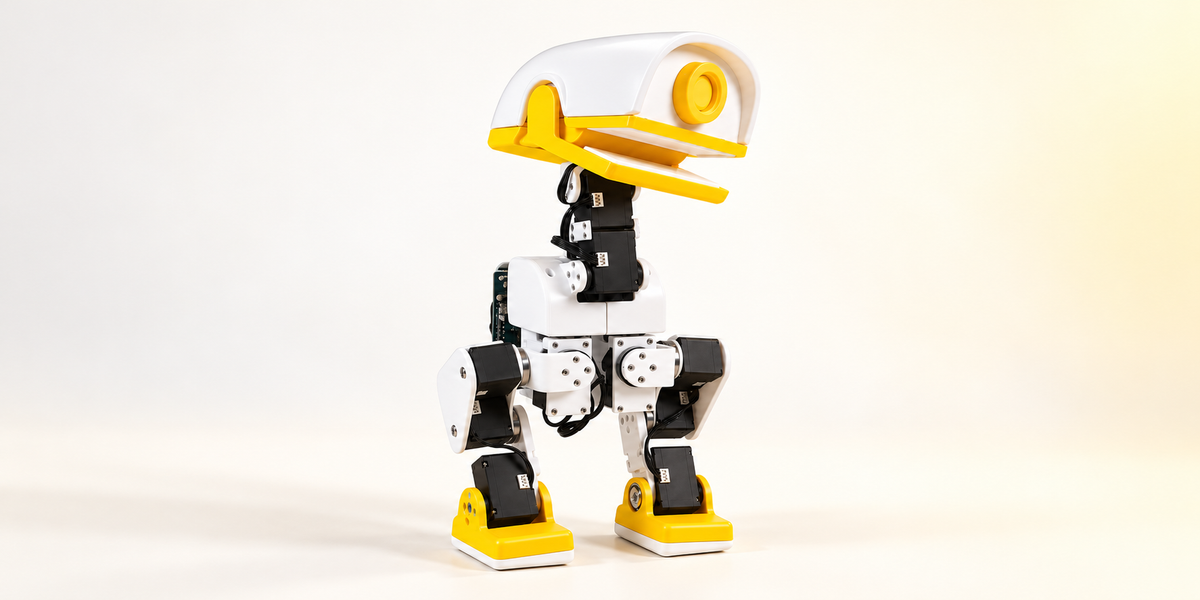
A character you can build. A system you can understand. With its expressive beak, articulated neck and two servo-driven legs, XGO-Duck makes robotics wonderfully tangible. Arduino UNO Q and 3D-printed parts are not included.
02 / BUILT TO MOVE
JOINTS
Every joint.
A new possibility.
Explore reinforcement-learning walking and get-up behavior. Trigger a pick motion manually with the articulated beak.
Leg joints
Two articulated legs. A hands-on introduction to biped motion.
Head & neck joints
A distinctive silhouette, with movement full of character.
Beak joint
An independently controlled beak for manually triggered pick motion.
Pick motion is manually triggered; object recognition and autonomous object search are not included.
 A CLOSER LOOK AT YOUR NEXT BUILD.
03 / YOUR HANDS. YOUR ROBOT.
Build it.
Move it.
Make it yours.
Prepare & assemble
Supply your own Arduino UNO Q. Download the structural files, print the rigid and flexible parts, then follow the assembly guide.
Connect & calibrate
Set up the project software and use the browser interface to configure servos, calibrate joints and control movement.
Explore & develop
Inspect the runtime or explore the training tools. Your next idea starts with understanding how it works.
04 / GO UNDER THE SHELL
Curiosity has
source files.
Public hardware files, runtime and reinforcement-learning tools. Explore the project, one layer at a time.
Start with the structure
STL files, BOM & assembly guide
↗02 / RUNTIMELook inside the motion
Arduino runtime & browser interface
↗03 / TRAININGExplore the next step
Simulation, learning & policy export
↗Custom policy training requires a separate CUDA-capable computer. Repository and file-specific license terms apply.
05 / THE DETAILS
Know your Duck.
The essentials behind the personality.
| Main controller | Arduino UNO Q (not included) |
|---|---|
| Actuation | 15 Feetech 1910 serial servos |
| Motion sensing | QMI8658A six-axis IMU |
| Control interface | Browser-based setup, calibration & control |
| Battery | 4000 mAh · 5C discharge |
| Charger | 8.4V 4A · UK / US / EU plug options |
| Structure | Buyer-provided 3D-printed parts |
WHAT ARRIVES
The electronics.
You bring the build.
Build your XGO-Duck with the included electronics and your own Arduino UNO Q. The controller and 3D-printed parts are not included.
View the official product information ↗Inside the electronics kit
- XGO-Duck expansion board
- 15 serial servos
- Battery pack (4000 mAh, 3C discharge)
- 8.4V 4A charger (UK / US / EU plug options)
- Cables, screws & bearings
Arduino UNO Q and 3D-printed parts are not included.
Supply your own Arduino UNO Q. Print and assemble the structural parts yourself. Joint calibration and software setup are required.
BEFORE YOUR FIRST STEP
Good questions.
Is Arduino UNO Q included?
No. The current electronics kit does not include Arduino UNO Q. Supply your own Arduino UNO Q to complete the build.
Does it arrive as a fully assembled robot?
No. This is an electronics kit without Arduino UNO Q and 3D-printed parts. The photos show the assembled result. You need to provide the controller, print the structural parts, assemble the robot, calibrate the joints and set up the software.
How do I control XGO-Duck?
The project provides a browser interface for movement, servo setup, calibration and robot status. Follow the runtime documentation to install and configure the software.
Does it include audio and video features?
Audio and video features are not included in the current kit. An audio and video kit will be released in the future. Add this kit to enable these features.
Can I train my own movements?
The public reinforcement-learning project provides simulation and policy-training tools. Custom training needs a separate CUDA-capable computer and familiarity with the development workflow.
DUCK.
XGO-Duck is adapted by Luwu Dynamics from Pollen Robotics’ Microduck.